PrintMD
A Markdown editor that exports print-quality PDF, Word and PowerPoint files, with a small PDF service that runs on your own computer.
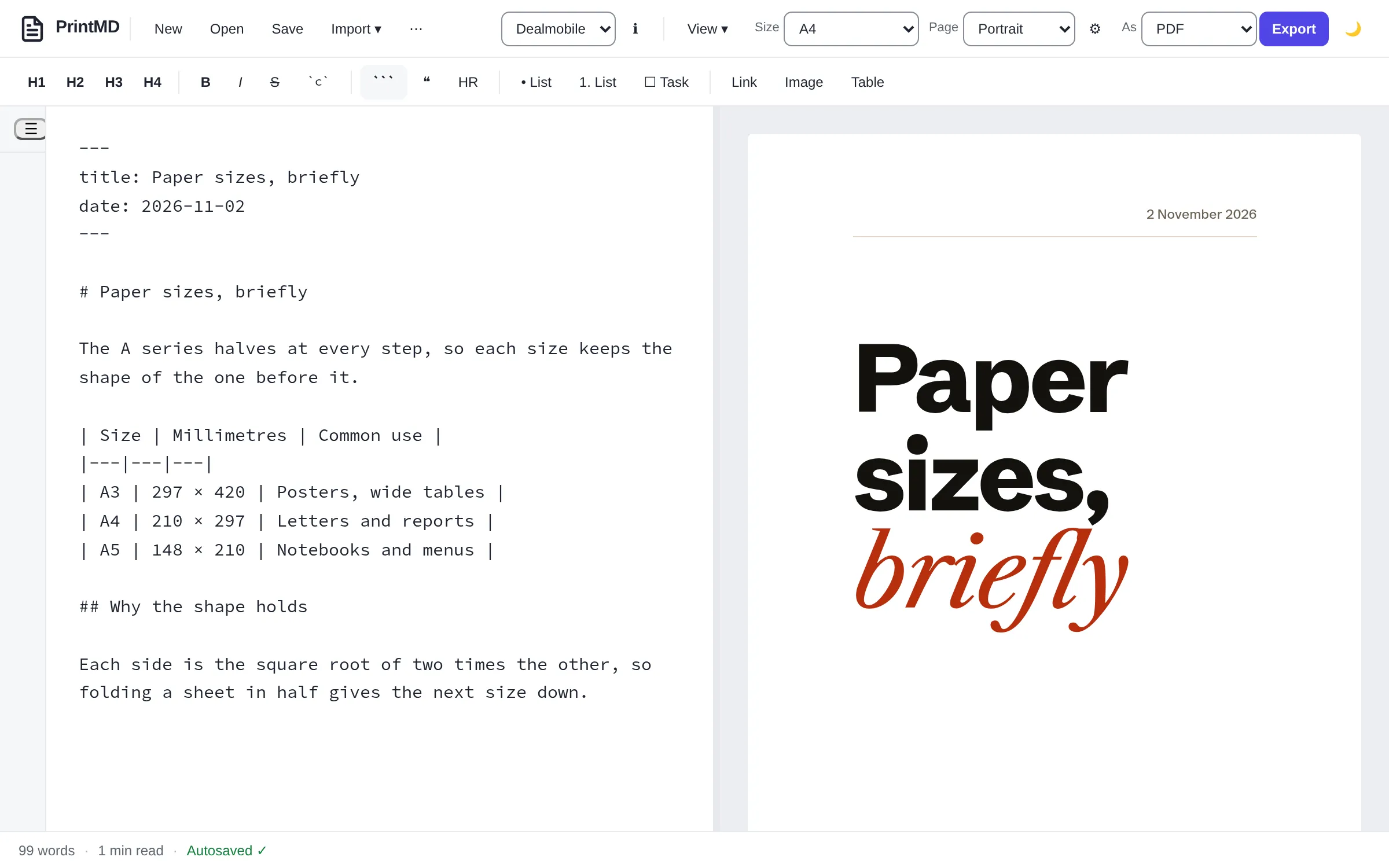
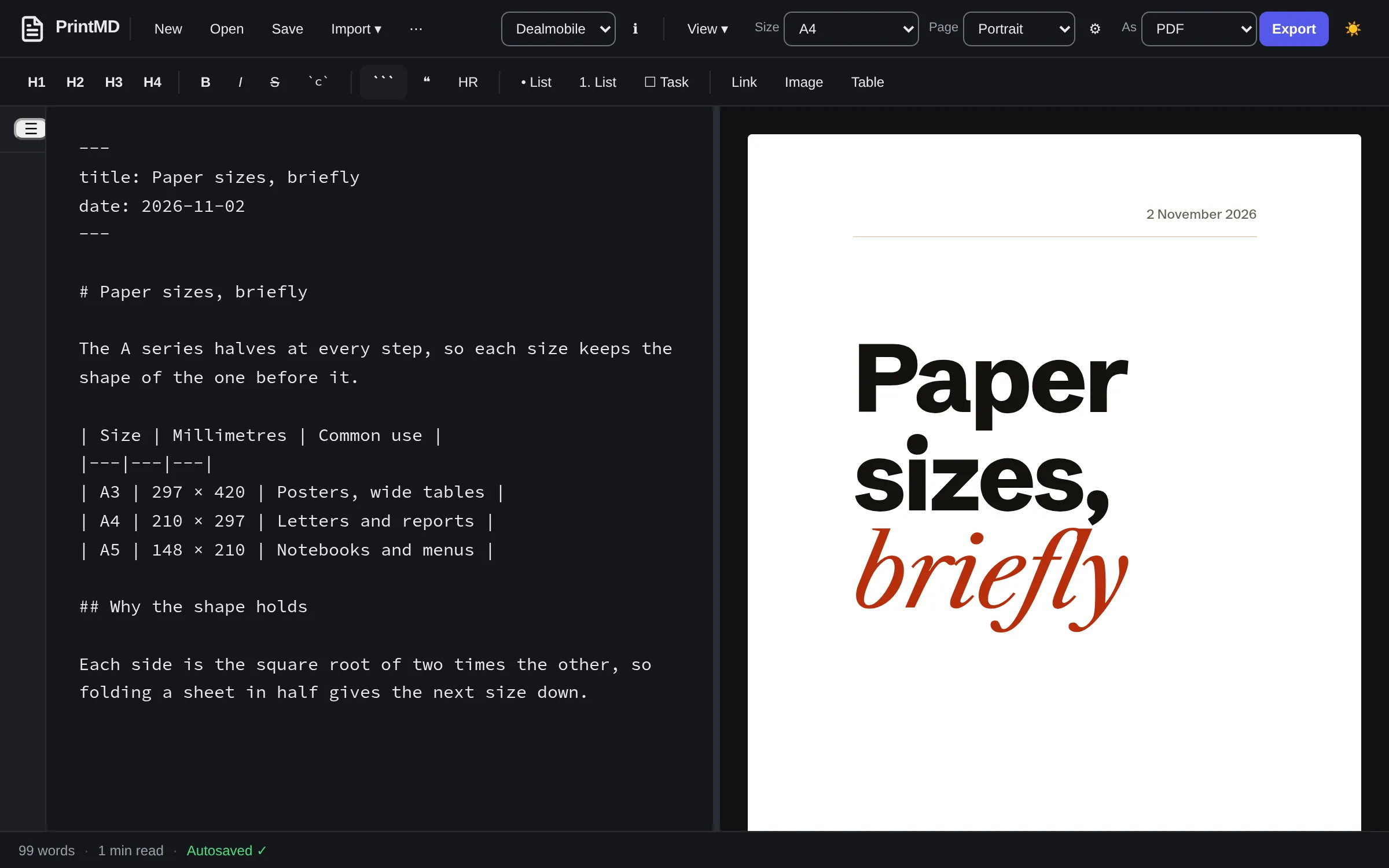
PrintMD is for anyone who writes in Markdown and then has to hand someone a document. I wanted PDFs from my own notes that looked as if someone had designed them, without opening a word processor. You write on the left, the page in the chosen template is on the right, and Export gives you a PDF, a Word file or a PowerPoint file from the same text.
The editor is plain HTML, CSS and JavaScript modules: no build step, no framework and nothing to install. Serve the folder and it runs.
What it does
- A live preview in the template’s own type and spacing, split or single pane, in a light or dark theme.
- Export to PDF, Word (
.docx) and PowerPoint (.pptx). - Import from PDF, Word, HTML, EPUB and Google Drive, converted to Markdown. A publicly shared Google Doc imports from its link without signing in, and a shared Sheet brings its first tab as a table. For private files, each visitor signs in with their own Google account and supplies a Google Cloud client ID of their own, plus an API key for the Drive picker.
- Page options for each document: A4, A3, A5, Letter or Legal, or a custom size, one continuous page as tall as the content, wide tables scaled to fit, and your own margin.
- Front matter at the top of a document sets the cover’s title, author and date, and its layout, fit and margin. The PDF service reads its page size too.
- Code blocks coloured in more than 190 languages, footnotes, definition lists, and
==highlight==,~sub~and^sup^. - Documents are kept in the browser. In Chrome and Edge, a file you open from disk stays linked to it, so saving writes back to the file.
There are two templates. Unbranded is a quiet, classic document and the default. Dealmobile is a magazine article: heavy grotesque headlines over a Caslon text face, one red accent and a running head and foot.
The PDF service
The repository also holds a small HTTP service. Send it Markdown and it sends back a PDF, printed by a browser on your own machine: the Chromium that Playwright downloads, or your own Chrome if you point it there:
curl -s -X POST 'http://127.0.0.1:8787/api/v1/render?template=dealmobile' \
  -H 'Content-Type: text/markdown' --data-binary @notes.md -o notes.pdf
Response headers report the page count and anything the render found, such as an image too small to print well. The service only runs on your own computer: it refuses to start on any address that isn’t loopback, or with a token or a login in front of it. That is on purpose, and a post of its own explains why.
A Claude Code skill ships in the repository, in skills/printmd. With it installed, “make a PDF of notes.md in the Dealmobile template” is enough. Claude checks the service is running, lists the templates, embeds the document’s local images, writes the PDF next to the Markdown and reports its path and page count. It needs Claude Code on your own machine, because that is where the service is.
How it’s built
Markdown is parsed with marked and cleaned with DOMPurify. The Word and PowerPoint files are built in the browser with JSZip and PptxGenJS, and the importers use pdf.js, Mammoth and Turndown. The libraries and fonts live in the repository’s vendor folder, and the page’s content security policy only loads fonts from the app itself.
Most of the work went into making the PDFs right rather than nearly right: embedded fonts, the exact page size, no heading left at the foot of a page, and tables that repeat their header row. Print-quality PDFs from a browser covers those rules, and custom sizes, one long page and fit to width covers the page options. The tests print sample documents and check the PDFs with the poppler tools.
How to use it
The hosted editor is there for a look around. The editor makes its PDFs through the browser’s print dialog, hosted or not; the PDF service is the other route, and it only runs locally. To get everything, run it on your own machine:
git clone https://github.com/tomgould/PrintMD.git printmd
cd printmd
python3 -m http.server 8080
Then open http://localhost:8080 in a recent Chrome or Edge. The PDF service needs Node 22:
npm --prefix server ci
npx --prefix server playwright install chromium
npm --prefix server run start:local
It listens on http://127.0.0.1:8787. On Linux, server/service/install-service.sh installs it as a user service that starts at login.
Writing about it
-

 A PDF service that only runs on your machine
PrintMD’s PDF service turns Markdown into a PDF with one request, and it refuses to be hosted. Why that’s on purpose, and how it stays locked down…
-

 Custom sizes, one long page and fit to width
Not every PDF is an A4 page. PrintMD’s page options cover a custom size, one continuous page, scaling wide tables to fit and your own margin, and…
-

 Print-quality PDFs from a browser
A browser can print any page to PDF, but a document you send someone needs more. How PrintMD gets fonts, page breaks and images right, and what its…
-

 Why I built PrintMD
I write in Markdown, and getting from there to a PDF I’d happily send someone was more work than it should be. So I built an editor that shows the…
Featured projects
-

 Mullet
A job runner that plans a coding job, runs it unattended in a sandboxed clone, and marks each step done only when its own checks pass.
-

 Solar Calendar
A calendar of 13 identical 28-day months, with each year starting on the first Monday on or after the spring equinox.
-

 Where Should I Live
Rank cities around the world by what you’d keep after tax, what a month costs, which visas you can get and how each place fits the way you live.