The packages I kept on a Google TV
The other half of decluttering a TCL Google TV: a keep-list of 35 packages that debloat lists remove or that only look disposable, how each one got there, and the script that refuses to touch them.
Decluttering our TCL Google TV switched off 34 packages. The list of packages it wasn’t allowed to touch is one longer, at 35, and took more care. Debloat lists for these TVs are easy to find, and they contradict each other: a package one list removes as junk is, according to another, the one that runs the inputs menu. Every entry on the keep-list has its reason beside it, and the script that switches packages off refuses anything on it. This is how the list was made.
Reading before running
Fifteen repositories went into a folder for reading: debloat scripts, launchers, remote-control libraries and two old TCL projects, all cloned and none of them run. Three had package lists worth comparing.
- TCL-Google-TV-Debloat-Optimizer is a PowerShell script for TCL Google TVs. It uninstalls rather than disables.
- tv-vibehack is a Google TV clean-up driven by an AI agent, built around the “Clean Your TV” prompt on tv.cobanov.dev: disable in batches, keep a restore script, and never touch the inputs, Wi-Fi, the remote, Play services or the keyboard.
- Universal Android Debloater Next Generation, or UAD-NG, is a phone debloater, but it rates each package from Recommended to Unsafe with a reason, and much of Android is the same on a TV.
Most of the TCL-specific advice comes from small projects or a single report. None of it was taken as true until it had been checked on this TV, and anything that couldn’t be checked safely went on the keep-list instead.
Where they disagree
The TCL script removes com.tcl.suspension and com.tcl.ttvs. The cobanov prompt says the first is the Inputs menu and the second is the update menu. Testing either meant risking the HDMI inputs on a TV we use most evenings, so both stayed.
The TCL script also removes com.google.android.tts, which sounds like text-to-speech and nothing more. On this TV it’s the speech recogniser, so removing it would have stopped the voice button:
$ adb shell settings get secure voice_recognition_service
com.google.android.tts/com.google.android.apps.speech.tts.googletts.service.GoogleTTSRecognitionService
It removes com.google.android.tungsten.setupwraith too, which UAD-NG says breaks volume control on Sony’s Google TVs, and the print spooler, the HTML viewer and the contacts and calendar providers, which UAD-NG links to a broken Settings menu and boot loops. tv-vibehack’s example for an Acer TV disables com.android.tv.frameworkpackagestubs. UAD-NG rates that one Expert: it answers when an app opens a link that nothing else handles, and some apps crash without it. One blog reports that uninstalling every package with TCL in its name left a TV that wouldn’t boot, or factory reset properly.
Checking on the TV
Some claims can be checked without changing anything. A setting such as voice_recognition_service names the package behind a feature. dumpsys activity services shows what a package is running, and dumpsys package shows whether the system keeps it alive. That’s how com.mediatek.backgrounddetection, which sounds like something to switch off, turned out to be a persistent system app running AipqService, MediaTek’s AI picture quality, at about 65 MB:
adb shell dumpsys activity services com.mediatek.backgrounddetection | grep ServiceRecord
adb shell dumpsys package com.mediatek.backgrounddetection | grep pkgFlags
The reports of boot loops can’t be checked that way. com.android.sdksandbox and com.android.location.fused are each said to stop a TV booting, and disabling the stock launcher on Android 14 is said to leave a black screen. Finding out means risking a factory reset, which would undo everything else as well. Two TCL packages, com.tcl.providers.config and com.tcl.initsetup, are reported to drop the Wi-Fi when disabled, and ADB runs over the Wi-Fi here, so that change would also cut off the way to undo it. All of them went on the list untested, with the source of the claim beside them.
The ones that only matter here
Some entries aren’t about what TCL ships. Projectivy Launcher and Key Mapper are on the list because the home screen and the remapped Disney+ button depend on them. com.tcl.guard, TCL’s Safety Guard, sounds disposable, but it owns the per-app Auto Launch setting behind the AUTO_START permission those two need to survive a restart. com.tcl.useragreement holds TCL’s terms, the Freeview Play agreement among them. com.google.android.tv.remote.service is what a phone’s TV remote talks to.
That leaves the keep-list as a mix of three kinds of entry: packages checked on this TV, claims from elsewhere taken on trust, and things this particular setup needs. The comments say which is which.
How the script uses it
The batch script reads the keep-list as exact package names and checks every entry in a batch against it before disabling anything:
if grep -qxF "$p" <<<"$keep"; then echo "REFUSED $p (on keep-list)"; continue; fi
Given a batch made of the packages other lists remove, it changes nothing:
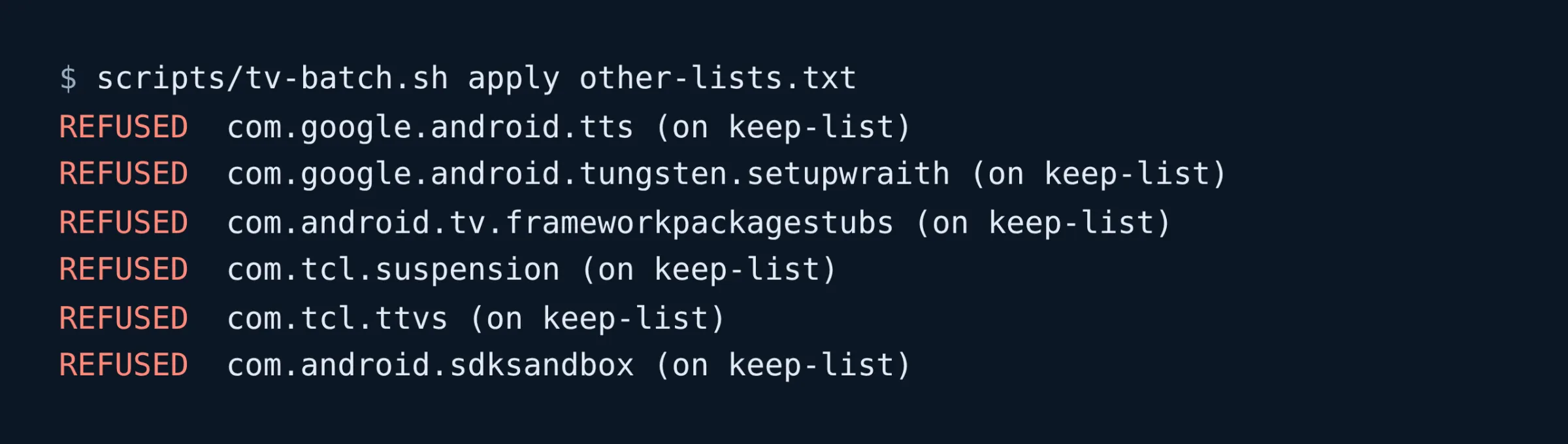
The health check reads the list too. tv-status.sh fails if anything on it is disabled, which catches a package switched off by hand, outside the script.
What it misses
The keep-list protects the TV from my own batches, not from TCL. An update could rename a package, or move a feature into one that isn’t listed. The untested entries are the weak part: some of the packages kept because of a boot-loop report may be harmless on this model, and the list can’t say which. And it’s for one TV, a 65C6K on Android 14. On another model it’s a place to start, not an answer.
Using it
The list is config/keep-list.txt in the repository, one package per line with its reason as a comment. To see whether anything on it is disabled on your own TV, run the health check, or compare it by hand:
adb shell pm list packages -d | sed 's/^package://' > disabled.txt
grep -vE '^\s*(#|$)' config/keep-list.txt | awk '{print $1}' | grep -xFf disabled.txt
No output means nothing on the list is switched off. Before experimenting with a package you’re unsure of, add it to the list first, and take it off again once you know.