Decluttering a TCL Google TV without rooting it
Switching off 34 packages on a TCL Google TV over ADB, replacing the home screen, and finding the TCL-only permission that stopped the replacement surviving a restart.
Our TCL 65C6K is a Google TV running Android 14 on a MediaTek chip with about 2.4 GB of RAM. Out of the box it ran TCL’s on-screen stickers, an offers inbox, a channel of free ad-supported TV, a home feed and an Alexa client, all next to Google’s own home screen. It also switched itself off after four hours without a press on its own remote, which is most evenings, because we watch through a Fire Stick. None of this needs root. Android’s debug bridge, ADB, can switch packages off, change settings and read the system log over the network, and every change can be undone. This is how.
Getting in
ADB is behind Developer options: press OK on the build number seven times, then turn on USB debugging. Despite the name, it then listens on the network, on port 5555. The TV advertises itself over mDNS, so finding its address doesn’t need the router:
avahi-browse -rt _androidtvremote2._tcp | grep address
adb connect 192.168.1.x:5555
The TV asks once whether to trust the computer. Before changing anything I saved the package lists to files: 171 packages, seven of them outside the system image.
Switching things off, not removing them
pm uninstall --user 0 and pm disable-user --user 0 both make an app disappear, but a disabled package stays where it is, and pm enable brings it back. A factory reset restores everything either way. I only ever disabled, through a short script that reads a batch file, refuses anything on a keep-list and logs each change with a timestamp:
scripts/tv-batch.sh apply batches/batch-01.txt
scripts/tv-batch.sh undo  batches/batch-01.txt
The batches were about ten packages each, with a check of the inputs, voice, casting, the phone remote and the streaming apps in between. Thirty-four went in the end: TCL’s stickers, offers, free channels, home feed, account service, gallery, media player and hearing-aid suite, Alexa, AirPlay, TalkBack, Google’s feedback reporter, Play Games, the service that pushes partner apps onto the TV at setup, Google’s Privacy Sandbox ad services, and two that were costing memory for nothing. MediaTek’s own AirPlay daemon was still running at about 63 MB resident even with TCL’s AirPlay app switched off, and calendar sync was sitting at about 128 MB on a TV that has no calendar.
The keep-list mattered more than the batches. The debloat lists on GitHub disagree with each other, and following them blindly would have broken things. One TCL script removes com.google.android.tts, which this TV uses to recognise speech, so the voice button would have stopped working. Universal Android Debloater warns that removing setupwraith breaks volume control on another make of Google TV, and one report says disabling the stock launcher on Android 14 leaves a black screen. I didn’t test those claims. They went on the keep-list instead.
A new home screen
Google TV has an “Apps only mode” that strips the recommendations off the home screen. With it on, the remote’s voice button said “not available in this profile”. The log after a simulated press was explicit:
Assistant is not enabled in LauncherX kids mode or privacy mode. Will punt.
So the decluttering had to come from somewhere else: a replacement home screen.
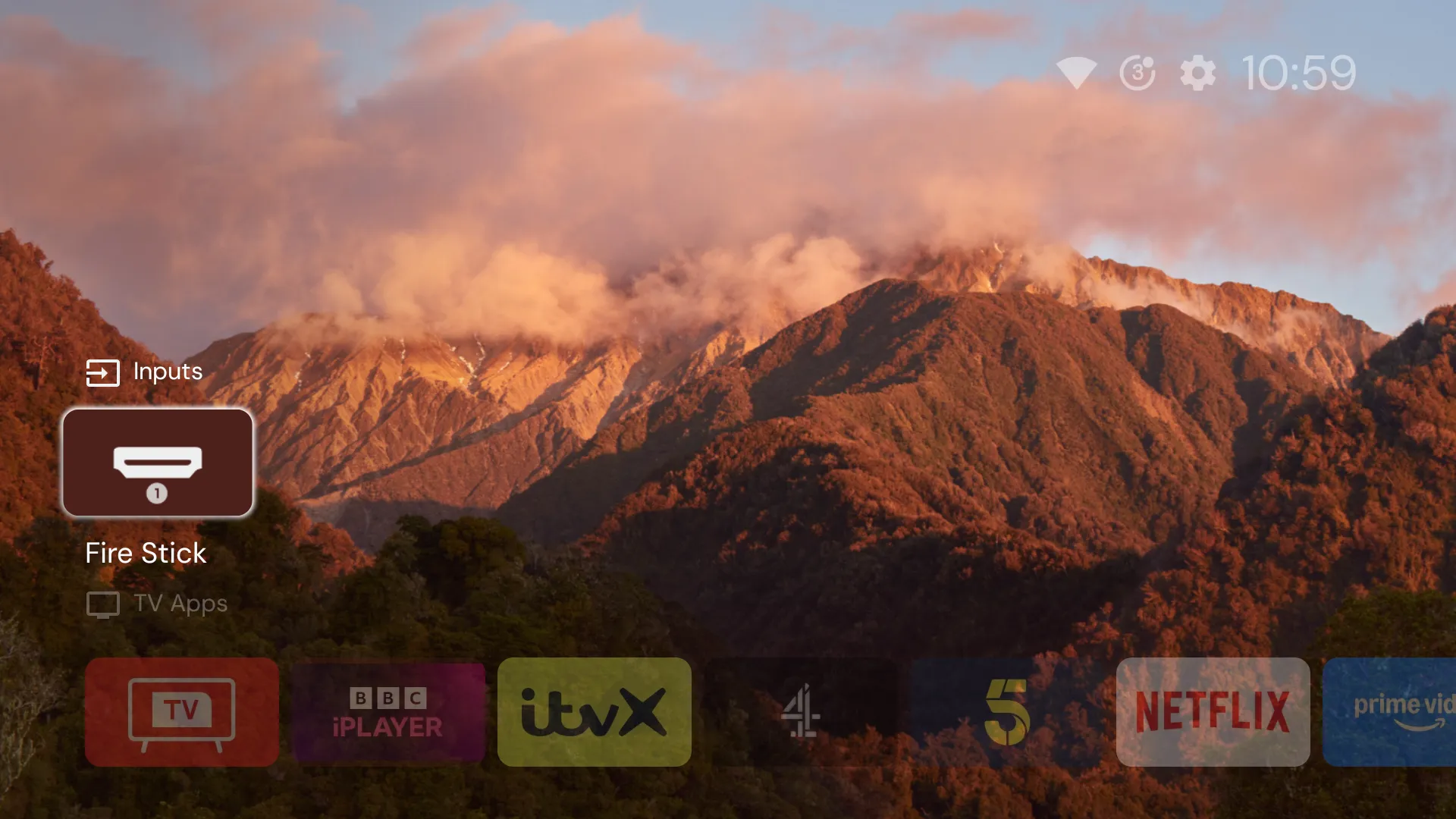
Projectivy Launcher takes over the Home button through an accessibility service, and leaves Google’s launcher installed underneath. Setting it up hit an odd snag first. I had been reading the screen as text with uiautomator dump, and that suspends every other accessibility service while it runs, so Projectivy’s switch wouldn’t stay on until I stopped looking.
It worked until the first restart, when Home went back to Google’s screen. The log said why:
[TclAppBoot]:forbid bind service ComponentInfo{com.spocky.projengmenu/com.spocky.projengmenu.services.ProjectivyAccessibilityService}
Turning the TV off and on with the remote turned out to be a suspend rather than a boot, so this only bites after a power cut, an update or a restart from the menu.
Finding TCL’s boot blocker
TclAppBoot isn’t in Android’s own services.jar. The system server’s classpath points at a TCL module, /apex/com.tcl.tcore/javalib/tcl-service.jar, and copying that off the TV and searching its strings turned up the rules: start-up is allowed for apps with a permission called OP_AUTO_START, and refused otherwise. The log’s reason for refusing Projectivy, spelling included, was callee_does't_have_OP_AUTO_START_permission.
AUTO_START is an app-op that only TCL’s build has, and it defaults to ignore for every app. TCL’s Safety Guard app seems to have a per-app “Auto Launch” switch for it, going by its strings, but one command does the same job:
adb shell cmd appops get com.spocky.projengmenu AUTO_START
adb shell cmd appops set com.spocky.projengmenu AUTO_START allow
The restart that forgot
The first restart after that put the permission back to ignore, and a batch of packages I had disabled a second earlier came back on. adb reboot restarts without the normal shutdown, and Android doesn’t write either change to disk the moment it’s made. In Android 14’s source, package settings are saved 10 seconds after a change (WRITE_SETTINGS_DELAY) and app-ops 30 minutes after (WRITE_DELAY). I had set the permission at 19:06:59 and restarted at 19:36:47, 12 seconds short.
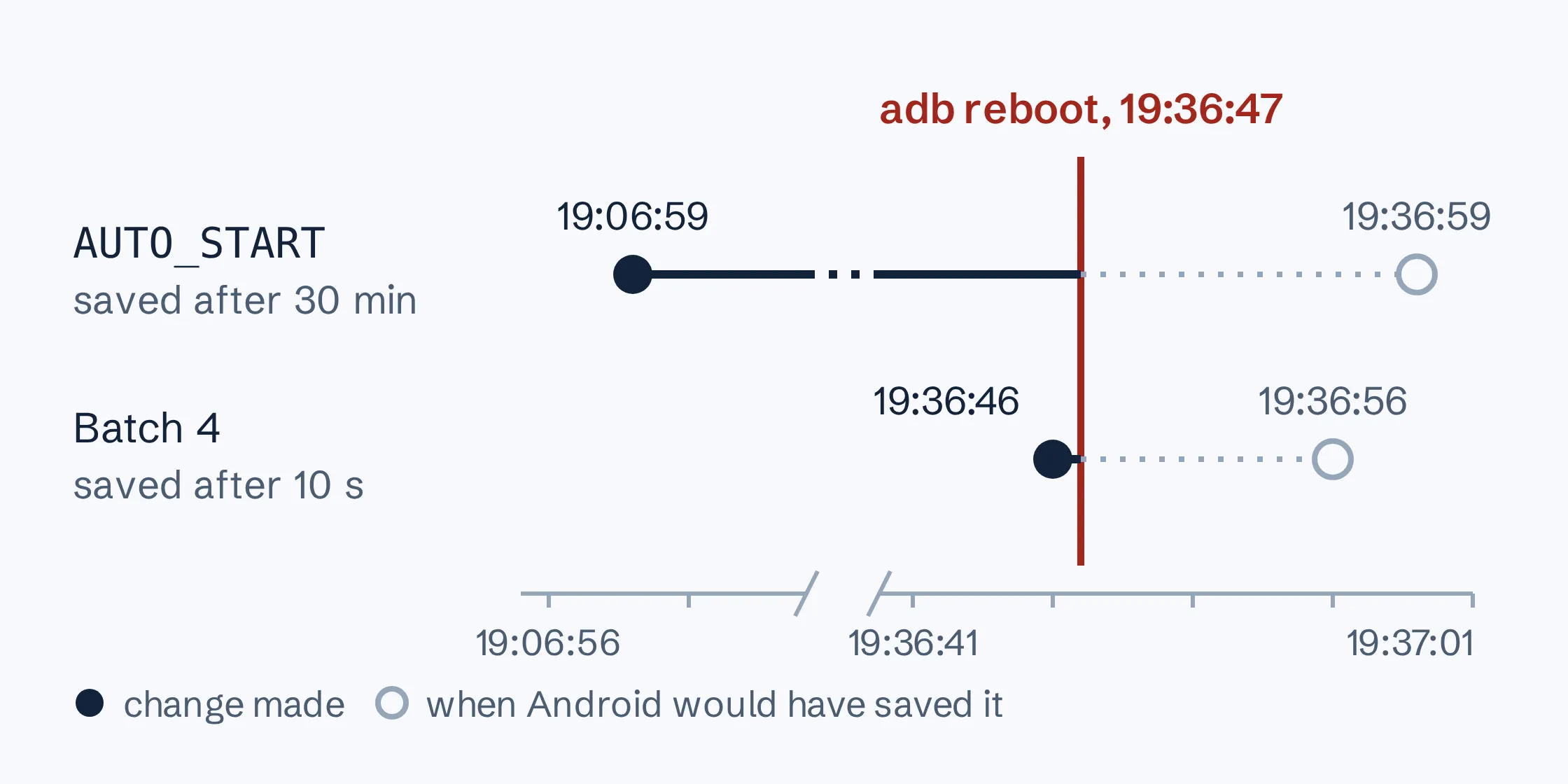
Setting it again and saving it straight away proved the fix without another restart: the accessibility service bound at once with Projectivy not running, where before it was refused unless Projectivy was already open. From then on, every restart went through a shutdown that saves state first:
adb shell cmd appops write-settings
adb shell svc power reboot
After that, Projectivy came back by itself, and it brought a race with it. The TV switched to the last input, and Projectivy replaced what it took to be Google’s home screen 0.3 seconds later, landing on top of the Fire Stick. Projectivy’s own “Launch on boot” option on the HDMI 1 tile settles it, by opening HDMI 1 itself once it has started.
The remote, the Fire Stick and the power
The auto power-off was the “When watching” shut-off timer, which counts input to the TV itself, and the Fire Stick’s remote talks to the Fire Stick. Setting it to Never stored -1 in secure attentive_timeout. The “When inactive” timer stays at 20 minutes, so the TV still turns off if it’s left on a menu. HDMI-CEC’s “Power on the TV in sync” lets the Fire Stick’s remote wake the TV, but only once CEC is on at both ends. The TV’s log showed it hadn’t received a single CEC message from the Fire Stick, whose own “HDMI CEC Device Control” was off. With that switched on, the TV going to standby sends the Fire Stick to sleep, and the Fire Stick’s Home button brings the TV back on HDMI 1. The power-on setting now returns to the last input rather than the home screen.
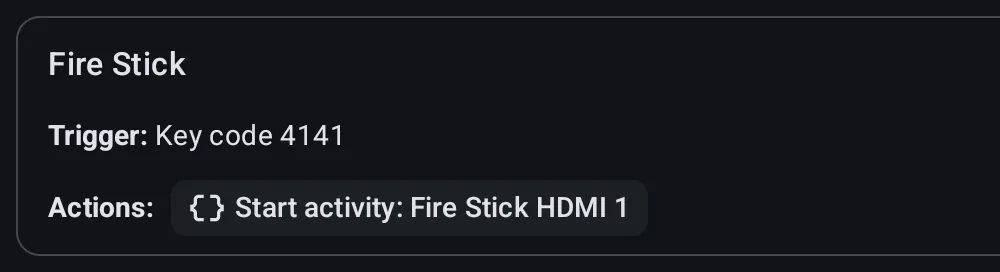
The branded buttons are harder. We don’t use Disney+, so I wanted its button to switch straight to the Fire Stick. The remote sends HID usage 0x0C004D, which Linux reports as KEY_UNKNOWN, and TCL’s input code turns it into keycode 4141. TCL’s shortcut-key manager then launches the app, from a configuration that can’t be edited without root. Projectivy’s own button settings turned out to be a few fixed shortcuts, so the remap went to Key Mapper, an open-source app that catches keys through an accessibility service and needs the same AUTO_START permission to survive a restart.
Key Mapper wouldn’t learn the button from a simulated press. input keyevent 4141 over ADB came back as “No trigger detected”, and replaying the captured press with sendevent was refused by SELinux. So it took one real press, after which the key map was a single intent, the same one that switches inputs from the command line:
adb shell am start -a android.intent.action.VIEW \
  -d 'content://android.media.tv/passthrough/com.tcl.tvinput%2F.TvPassThroughService%2FHW15'
YouTube without the ads
SmartTube is an open-source YouTube client for TVs. In late 2025 its developer’s machine was compromised and a build signed with the old key carried malware, so I installed the F-Droid build instead. F-Droid builds that from the published source and signs it with its own key. The file’s SHA-256 matched F-Droid’s index before it went on:
sha256sum app.smarttube.fdroid_2446.apk
adb install app.smarttube.fdroid_2446.apk
The official YouTube app stays, because casting from a phone goes to it. I left every other advert alone.
What it misses
It didn’t free much memory. With the TV idle on the home screen, 160 seconds after a restart, Android reported 954 MB available against about 950 MB before any of this. The disabled packages saved memory, but Projectivy, at about 238 MB resident, runs on top of Google’s launcher, which can’t be disabled and still uses about the same. What changed is what’s on screen and what runs in the background, not the free RAM. Menus do move faster, but that’s from halving Android’s three animation scales in Developer options, not from anything switched off. A restart takes about half a minute: the TV answers on the network again 32 seconds after the command.
Projectivy’s boot fix has a flaw of its own. After a restart or a power cut it opens HDMI 1 as asked, then does it again the first time its home screen opens, so the first press of Home lands back on the Fire Stick. The second press works.
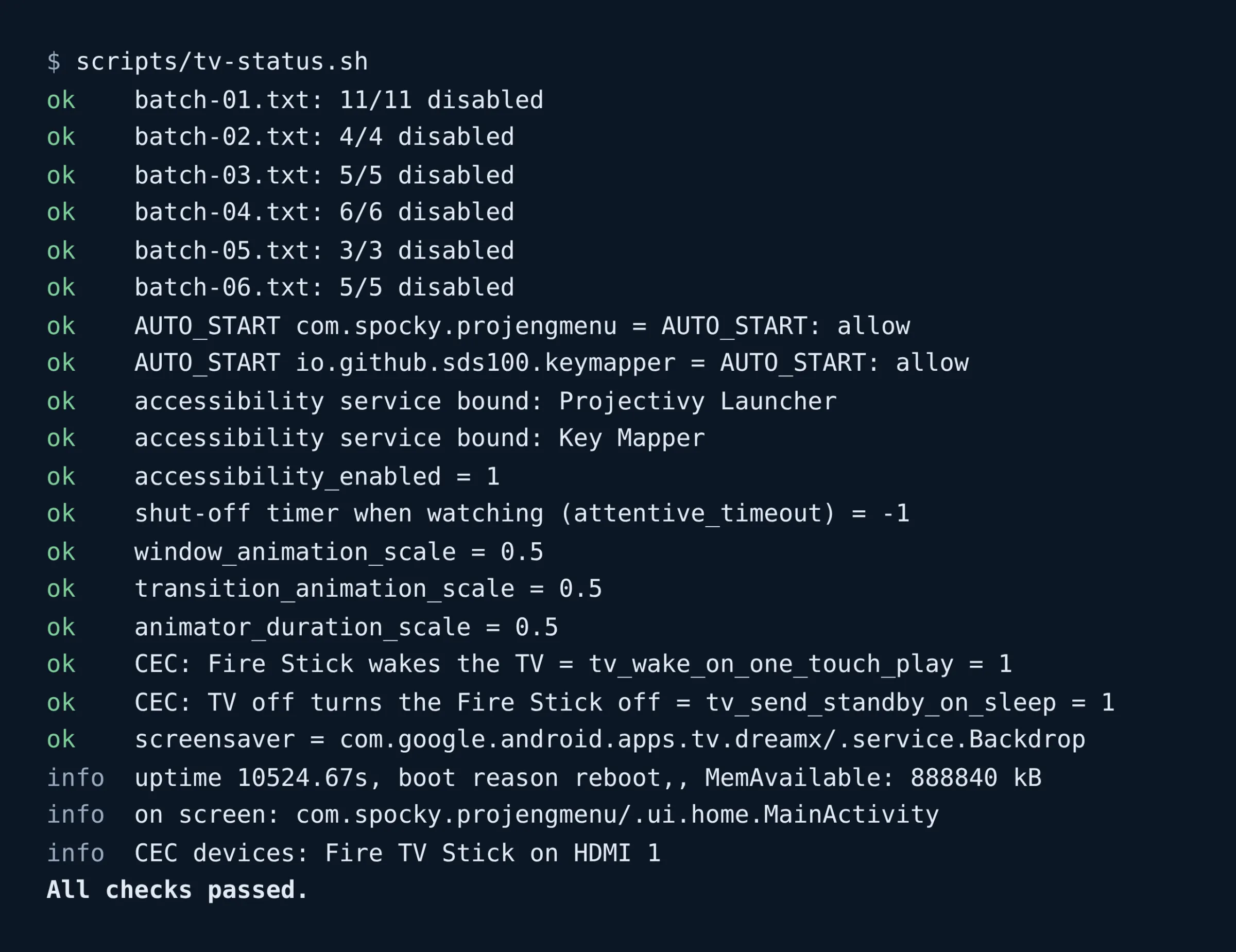
I don’t know what a TCL software update does to any of this. It may re-enable packages or reset AUTO_START. A read-only check, scripts/tv-status.sh, compares every batch, permission and setting with what they should be and exits non-zero if anything has moved, so the first update will at least be obvious.
All of it depends on ADB. Disabled packages and app-ops are stored on the TV, so they should survive USB debugging being switched off, but I haven’t tried that yet, and changing anything means switching it back on.
The scripts are on GitHub, and the product page lists what each one does. The TV’s other job, as a fourth screen for a laptop, has its own post.