GitHub Auditor
A command-line tool for looking after a lot of GitHub repositories at once, with reports on their health, on who has access and on what each developer did.
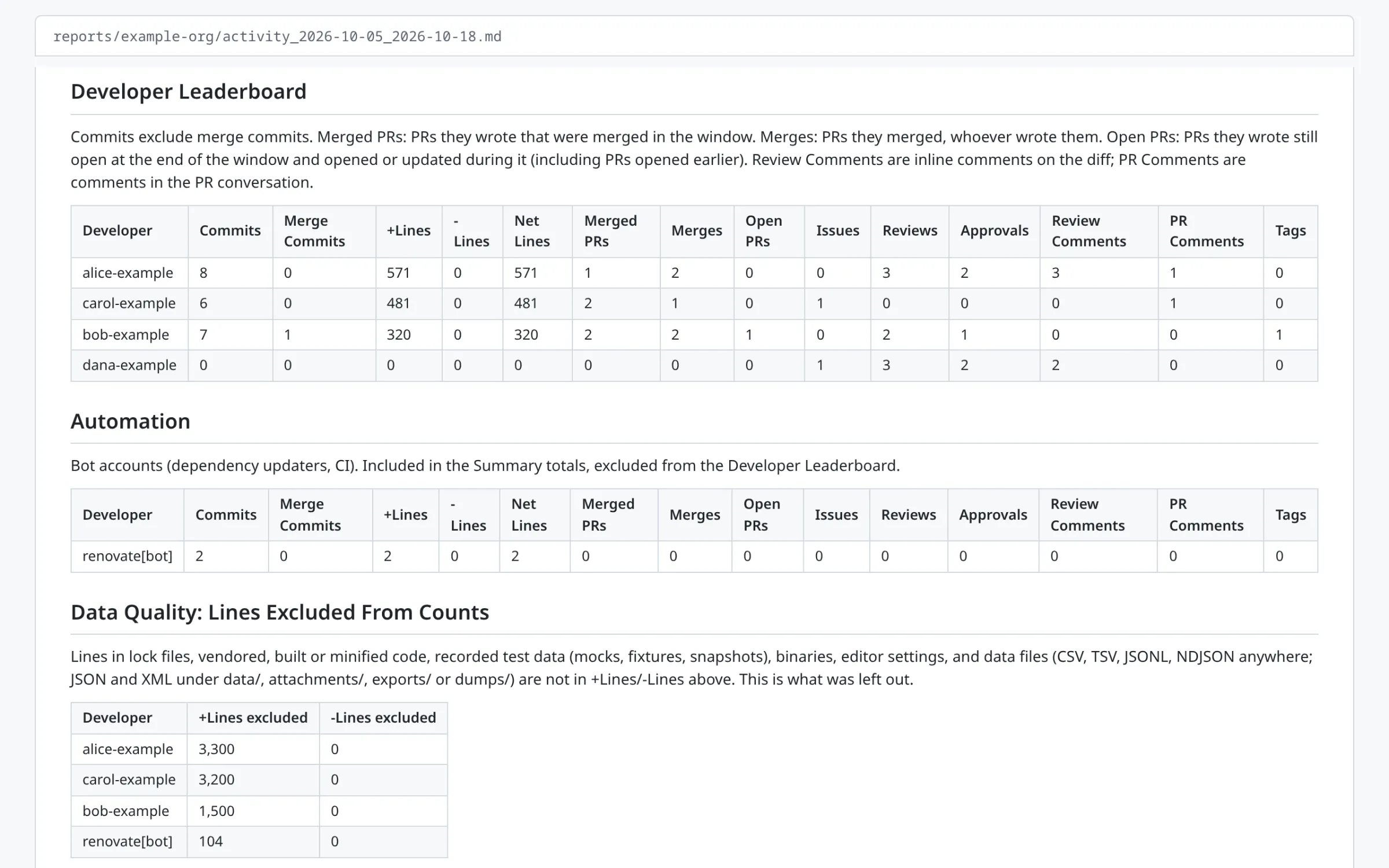
GitHub Auditor is for anyone looking after more repositories than they can keep in their head: a personal account with years of projects, or an organisation with dozens of repositories and people. It keeps a local clone of every repository. From those clones and the GitHub API it writes Markdown reports: which repositories are missing a README or a licence, who has access to what, and what each developer did in a given week or month. The installed command is auditer.
What it does
It has 13 commands. These four do most of the work:
checkoutclones every repository in an account, or pulls the latest changes, into separate folders for public and private repositories. It reports new branches and tags, spots force pushes, leaves alone any clone with uncommitted changes, and warns about local copies of repositories that have been deleted from GitHub.auditscans the clones, adds stars, forks, languages and topics from the API, and gives each repository a health score out of 100. The points come from having a README, a licence and a description, recent activity, not being archived and having few open issues. It also lists stale repositories and suggests which to pin.activityreports what each developer did over a date range: commits, lines added and removed, pull requests opened and merged, merges, reviews, approvals, comments, issues and tags. The report has a leaderboard, daily and weekly breakdowns, a table for each repository and a section for each developer, with a link to every commit. It can cover one repository, one developer or several accounts at once.accesswrites a matrix of every collaborator against every repository, showing the highest permission each one holds.
The others make changes in bulk: add or remove collaborators, remove organisation members, archive stale repositories, add a licence file (MIT, Apache 2.0, GPL 3.0, or the 2- or 3-clause BSD licence), set topics, and change settings such as the description, the wiki or the visibility. The risky ones, such as removing people, archiving or changing visibility, ask for confirmation first. It can also write a README for a repository from its contents, or a profile README for an account.
It works with any number of personal and organisation accounts, with other people’s public repositories, and with named projects that group repositories from several accounts. Bitbucket Cloud workspaces work for checkout, audit, activity, access, settings, READMEs, licences and listing collaborators and members.
How it’s built
It’s a Python 3.10 command-line tool built with Click. It uses httpx for the GitHub and Bitbucket APIs, Rich for the terminal output and PyYAML for the configuration.
Git does most of the work. The activity report reads commits, line counts and tags from the local clones, which is fast, costs no API requests and still works after access to an account has ended. Only pull requests, issues and reviews come from the API. If the API isn’t available, the report says so at the top and shows those columns as “n/a” rather than zero.
The activity report is the largest part of the code, and most of it is about counting fairly. Date ranges are whole days in one timezone, for git and the API alike. Lock files, vendored code, test fixtures, data exports and binary files are left out of the line counts, and the report lists what was left out for each developer. Someone who commits under several names or email addresses gets one row, and bots get a table of their own. Counting developer activity from git goes into the detail.
Tokens live in a config file that git ignores. Git authenticates through a short-lived GIT_ASKPASS script, so a token never appears in a clone URL, and anything that looks like a GitHub token is masked in the logs. The GitHub client retries server errors, and when the hourly rate limit runs out it waits for the reset instead of failing. There are 910 tests, written with pytest, with respx standing in for the APIs.
How to use it
It isn’t on PyPI, so install it from a clone:
git clone https://github.com/tomgould/github-auditor.git
cd github-auditor
python3 -m venv .venv && source .venv/bin/activate
pip install -e ".[dev]"
cp config.example.yaml config.yaml
Add your accounts and a personal access token to config.yaml, then clone everything and report on it:
auditer checkout --all --full
auditer audit --all
auditer activity --account my-org --since 2026-10-01 --until 2026-10-14
The reports go into reports/, with a folder for each account. A script in scripts/ runs the checkout for every account, ready to be called from cron each night.