

I write in Markdown. Notes, plans, short reports, the odd longer document. Plain text is quick, it diffs well and it never gets in my way. The trouble starts when someone else has to read it.
\nMost of the time that means a PDF, and getting from Markdown to a PDF that doesn’t look like a text file with a margin is more work than it sounds. Pasting into a word processor loses the structure. A browser’s print dialog gets most of the way, then splits a table across two pages or leaves a heading alone at the foot of a page. The command-line tools are powerful, and many of them want a pile of packages and a LaTeX installation.
\nI wanted one thing: write Markdown, see the page, press a button, and get a PDF I wouldn’t be embarrassed to send. That became PrintMD.
\nPrintMD is a Markdown editor with a live preview and two templates. The preview shows the page in the template’s own type and spacing, so it’s close to what you’ll print; page breaks and the running head and foot only appear in the PDF. Export gives you a PDF, a Word file or a PowerPoint file from the same text.
\nIt’s plain HTML, CSS and JavaScript modules. There’s no build step and no framework, so if you can serve a folder, you can run it. I made that choice early and haven’t regretted it: the whole thing can be read, and changed, by one person.
\nThe first version was an editor and a template. Then I wanted the PDFs to be right rather than nearly right, and that turned into most of the work:
\nEach of those has its own post: print-quality PDFs from a browser, custom sizes, one long page and fit to width, and a PDF service that only runs on your machine.
\nPrintMD is happiest on your own machine, and I want to be plain about that. Your documents stay in your browser. The PDF service prints with a browser on your own computer and listens only there. The editor also works hosted, and there it says that running it locally is better. The PDF service won’t run hosted at all.
\nIt’s a tool I use, so it grows when I hit a wall. If you try it and something is awkward, the issue tracker is the place to say so.
" }, "markdown_text": "---\ntitle: 'Why I built PrintMD'\ncanonical: 'https://www.dealmobile.co.uk/writing/why-i-built-printmd'\nurl: 'https://www.dealmobile.co.uk/writing/why-i-built-printmd'\ntype: Post\npublished: '2026-11-02'\nsummary: 'I write in Markdown, and getting from there to a PDF I’d happily send someone was more work than it should be. So I built an editor that shows the page as I type and exports PDF, Word and PowerPoint from the same text.'\n---\n\n# Why I built PrintMD\n\nPublished 2026-11-02\n\n\n\nI write in Markdown. Notes, plans, short reports, the odd longer document. Plain text is quick, it diffs well and it never gets in my way. The trouble starts when someone else has to read it.\n\nMost of the time that means a PDF, and getting from Markdown to a PDF that doesn’t look like a text file with a margin is more work than it sounds. Pasting into a word processor loses the structure. A browser’s print dialog gets most of the way, then splits a table across two pages or leaves a heading alone at the foot of a page. The command-line tools are powerful, and many of them want a pile of packages and a LaTeX installation.\n\nI wanted one thing: write Markdown, see the page, press a button, and get a PDF I wouldn’t be embarrassed to send. That became [PrintMD](https://www.dealmobile.co.uk/projects/printmd.md).\n\n## What it is\n\nPrintMD is a Markdown editor with a live preview and two templates. The preview shows the page in the template’s own type and spacing, so it’s close to what you’ll print; page breaks and the running head and foot only appear in the PDF. Export gives you a PDF, a Word file or a PowerPoint file from the same text.\n\n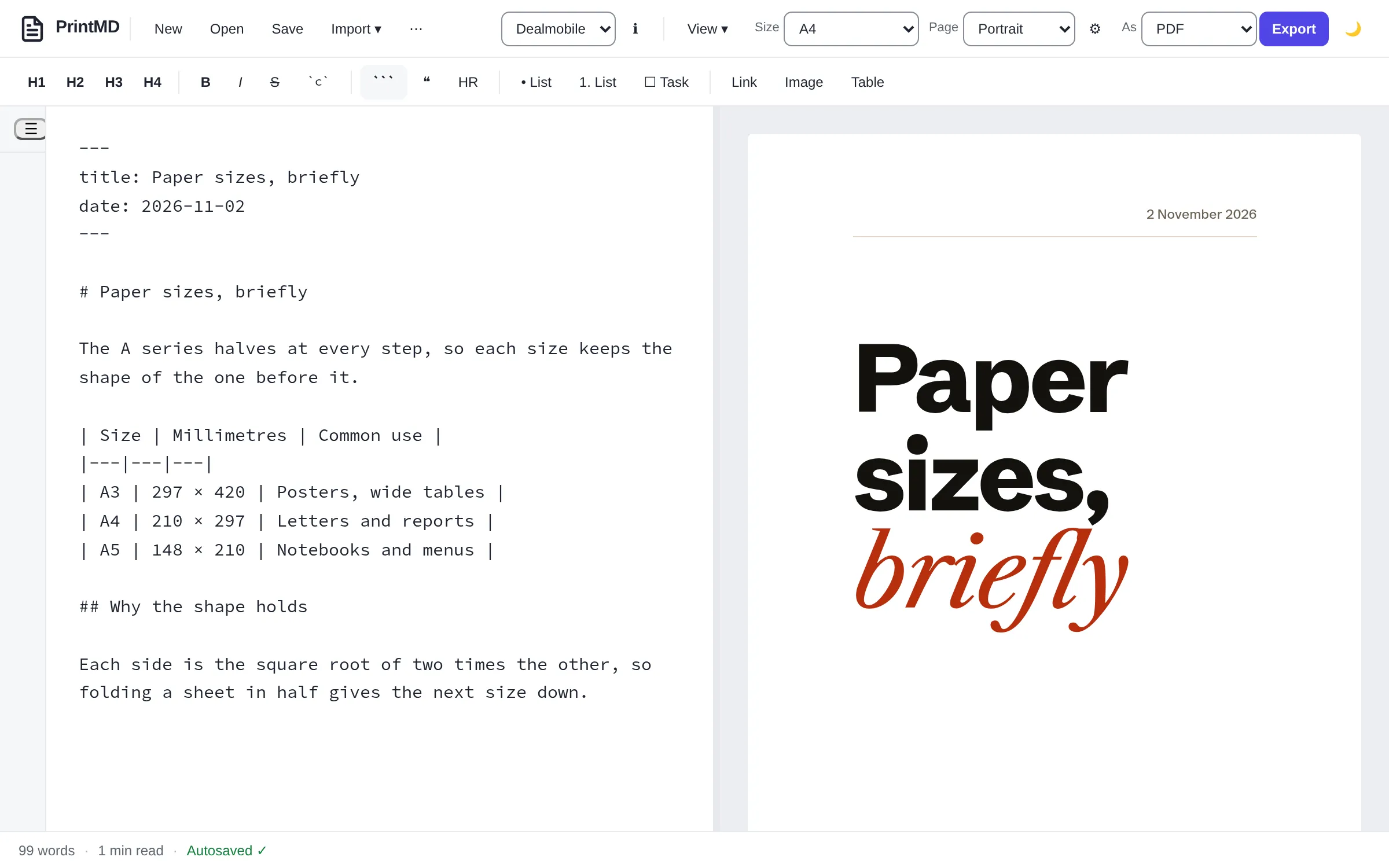\n\n*The second template, Dealmobile, styles a document like a magazine article. The first, Unbranded, is the quiet default.*\n\nIt’s plain HTML, CSS and JavaScript modules. There’s no build step and no framework, so if you can serve a folder, you can run it. I made that choice early and haven’t regretted it: the whole thing can be read, and changed, by one person.\n\n## Where it grew\n\nThe first version was an editor and a template. Then I wanted the PDFs to be right rather than nearly right, and that turned into most of the work:\n\n- Fonts are bundled with the app and embedded in the PDF, so it doesn’t depend on what the reader has installed.\n- Page breaks follow a few simple rules: a heading stays with the text after it, a table row stays whole where it fits on a page, and a table that runs on repeats its header.\n- Page size is a choice for each document, including a custom size, and so is a single long page for things that aren’t really pages.\n- A small service on my own computer turns a Markdown file into a PDF with one command, which is how I use it from scripts and from other tools.\n\nEach of those has its own post: [print-quality PDFs from a browser](https://www.dealmobile.co.uk/writing/print-quality-pdfs-from-a-browser.md), [custom sizes, one long page and fit to width](https://www.dealmobile.co.uk/writing/page-options-custom-size-continuous-fit.md), and [a PDF service that only runs on your machine](https://www.dealmobile.co.uk/writing/a-pdf-service-that-only-runs-on-your-machine.md).\n\n## Why local\n\nPrintMD is happiest on your own machine, and I want to be plain about that. Your documents stay in your browser. The PDF service prints with a browser on your own computer and listens only there. The editor also works [hosted](https://printmd.dealmobile.co.uk), and there it says that running it locally is better. The PDF service won’t run hosted at all.\n\n## What next\n\nIt’s a tool I use, so it grows when I hit a wall. If you try it and something is awkward, the [issue tracker](https://github.com/tomgould/PrintMD/issues) is the place to say so.\n\n- **Projects:** [PrintMD](https://www.dealmobile.co.uk/projects/printmd.md)\n- **Tags:** [Markdown](https://www.dealmobile.co.uk/writing/tag/markdown.md), [JavaScript](https://www.dealmobile.co.uk/writing/tag/javascript.md), [PrintMD](https://www.dealmobile.co.uk/writing/tag/printmd.md)\n\n---\n\nIndex of this site: [llms.txt](https://www.dealmobile.co.uk/llms.txt)\n" }